Review
VS Mode: Capcom X Namco
by RevStu (November 4th, 2010 at 3:33 am)

With the launch on Wednesday night of Capcom Arcade (free), the iThing now has two “arcade portal” apps from two of the most famous coin-op companies. The two take very different approaches, and we couldn’t think of anything that could be more entertaining than setting them up against each other in a classic head-to-head arcade deathmatch.

(This is because it was late and we were tired.)
Capcom Arcade is a proper retro release. It comprises, at launch, four classic Capcom coin-ops: 1942, Commando, Ghouls’n'Ghosts and the original Street Fighter 2. You get three free credits per day (non-accumulating, so you can’t save them up for a big blowout), and you can buy more any time you like at a price of 10 credits for 59p/€0,79/99¢. Alternatively, you can purchase the games themselves for £1.79/€2,39/$2.99 each and play them as often as you like.
(It’s quite hard to figure out how to do the latter – I eventually stumbled across the option by tapping the girl in the Change booth.)

The first thing you’ll spot on entering the arcade are some atmosphere-ruining ads that aren’t shown in the App Store screenshots, but don’t fret too much, as they don’t appear during gameplay. Tapping any of the machines takes you into their attract mode, another tap shows you some basic instructions and a couple more taps get you into the game.
(The instructions are sometimes comically wrong – the SF2 ones are littered with terrible typos, get the directions the wrong way round, and describe a six-button pad when what you actually get is a four-button one plus an extra for instant special attacks, enabling you to knock out a quick Dragon Punch or Yoga Fire without any jiggling around on the d-pad. In fairness there IS a six-button option hidden away, but the game doesn’t mention its existence and good luck hunting for it.)
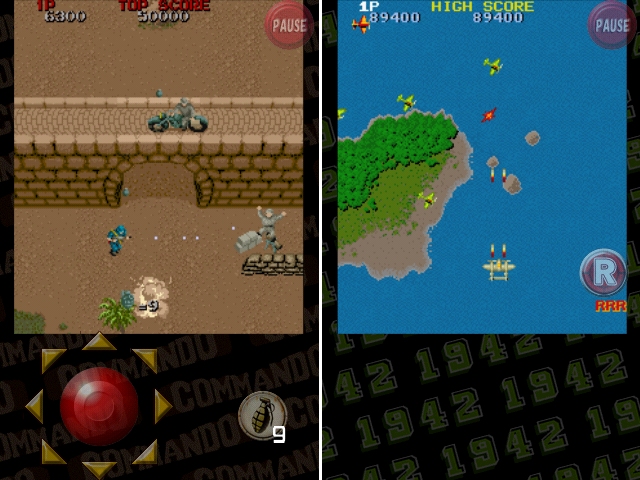
The games themselves work fairly well, barring some occasional slowdown (even on an iPhone 4). 1942 and Commando use the original aspect ratios, which means they get squished into barely half of the screen. (You don’t even get the option to stretch them out to fill the horizontal space, which weirdly you do with the two landscape games.)
1942 uses a relative joypad with autofiring guns, which is extremely effective if not exactly true to the original. Your increased manoeuverability makes the game significantly more enjoyable to play, though – it’s probably the most fun thing on the compilation – so that’s not really grounds for complaint unless you’re a seriously hardcore purist.
Commando, weirdly, doesn’t do the same thing despite having identical controls to 1942 in the arcades. Possibly that’s because it would have been odd to have your commando zipping around the screen at superhuman speed, but it still feels clumsy and awkward to suddenly be using a fixed joystick.

We’re not done with different control methods yet, though. Ghouls’n'Ghosts (depicted in a strangely subdued palette) gives fixed four-way directional buttons a try, about which the nicest thing that can be said is that they work considerably better than the iPhone-exclusive Ghosts’n'Goblins games. Ghouls is far too hard a game to have to wrestle with dodgy controls in, and it would have been more sensible to include the original Ghosts’n'Goblins instead, but you take what you’re given.
Finally there’s Street Fighter 2, in which the eight-way virtual d-pad makes a return. It works surprisingly well, but sadly the same can’t be said of the buttons, which appear to have a mind of their own. Playing as Dhalsim, I was able to make all three punch buttons issue Yoga Fires in a never-ending stream without my left thumb ever venturing near the joypad. It’s a pity, because otherwise the game runs very satisfactorily.

All four games supposedly also come with the option to use “Special Items”, such as 1942′s Full Power and Infinite Loops. I say “supposedly” because there’s no obvious way to actually select them. I tapped and swiped and tilted and shook, but all remained determinedly off, with nothing displayed onscreen to tell me what I might be doing wrong. Eventually I went back to the Change girl and realised that you have to buy those too, at 59p/€0,79/99¢ per game.
The blurb also mentions “Classic” and “iPhone” modes for each game, which I eventually tracked down under Options>Difficulty thanks to a helpful reader (Classic mode turns out to be the original arcade difficulty, and is a lot fiercer, but the game disappointingly makes no distinction between iPhone and Classic high scores). Someone needs a smack for the user interface in this app.
Surprisingly there’s no Game Centre or OpenFeint support, so online Street Fighter games are off the menu. Indeed, there isn’t even local Bluetooth VS play, which seems a major missed opportunity. All you get is the opportunity to post high scores to Facebook or Twitter, which does highlight one interesting quirk of Capcom Arcade.

Because as long as you don’t mind using Facebook or Twitter to keep your highscore records (rather than having them in-game), you can just delete the app every time you’ve used up your three credits, then install it again to instantly get three more, as many times as you like. (I say “instantly” – at an inexplicably bloaty 166MB you’ll have to wait a minute or two for it to download.) So if you think Capcom are pushing their luck asking a total price of almost £10/$16 for the fully-unlocked version of a slightly anorexic four-game emulator – with ads to boot – you can thumb your nose at them by playing it all day for free.
(Also, because there’s no OpenFeint or Game Centre login, if you have more than one iThing you can get three daily credits on each one. Or you can edit the date on your device to some point in the future then go back to the real date when you’re finished playing, which will preserve your high scores. You’ll have to pick a different date every time you pull the trick, as the game remembers which days you’ve had credits on, but it’s not like we’re going to run out of future.)
Now let’s talk about Namco Games Portal!

Namco Games Portal is absolute shit.
See you again soon for another exciting VS Mode, viewers!


“Now let’s talk about Namco Games Portal!
Namco Games Portal is absolute shit.”
QFT!! LOL
Request!
Are you able to make the main screenshots on the Podgamer front page into links to the full articles – i know that you can click on Continue reading… and also on the Headline but it’s more intuitive to click on the BIG screenshot which currently [sometimes] pointlessly links to the image itself ?
Thanks.. maybe
Peter
Ach, so that’s where this was. I lost it in the melee.
Yes, the front page now follows your excellent suggestion. You will receive your coveted Podgamer Fictional Prize shortly. GOOD WORK, CITIZEN.
Your review is awful, in SF2 you can change the buttons to the traditional 6 button layout. Learn to review.
Learn to read – the review does mention that fact. (Okay, we edited it in just before your comment arrived. But the game makes no mention whatsoever of the six-button option, and it’s not even under Options – you have to find it hidden several layers down in the Pause menu. So don’t be such a wanker.)
“tapping the girl in the Change booth”
Just a typical day for a stud like me.
I’m in agreement with everything you said. The interface graphics are terribly low res too. Coupled with the unintuitive menu system (where some options aren’t even available once you’re in-game), as well as the inconsistency in controls and comes across as a cobbled together student project.
That said, the game choice is great. I had a blast with SF II and with Ghouls’n'Ghosts (until I died rather quickly). The iPhone modes to reduce the difficulty for someone who was rather crap at the arcade versions (even though I have an arcade machine with these games and about 1000 more) is a very nice touch.
“Now let’s talk about Namco Games Portal!
Namco Games Portal is absolute shit.”
LOL. This is one of the reasons why Podgamer is the best review site on the Internets.
Regarding… Capcom Arcade: does anybody else get the feeling like it – and a lot of other of these emulated cash grabs by Capcom and SEGA – were thrown together in a week? I mean, I WANTED to like this. But how can I even take it seriously when Capcom can’t take the iOS platform seriously enough to 1) hire a designer for these ports, 2) not use what look like default system fonts all over the place.
The whole thing looks like the project was passed off to their lone iOS developer, and told he had a week to “put something together”. Then, they submitted his sample project to the App Store, leaving his placeholder graphics intact.
@stephen i don’t even dare to download gunstart heroes, for fear of ruining my memories of the game…